This guide includes a video from a previous user interface and experience of the SamCart platform. For a tour through all of the exciting new updates to your marketplace and dashboard, please reference this guide here: Get To Know Your Marketplace
Having trouble creating your SamCart account? Check out our guide on account creation!
Before you start selling, you'll want to spend a moment on your Marketplace Settings.
Most of these Settings were likely set when you initially created your account, but it's wise to make sure everything is to your liking before taking your product(s) live.
If you're new to SamCart or selling online, don't be overwhelmed by these. Only a few are required, and we'll highlight what you need to focus on below.
To access your Marketplace Settings, click your logo in the top right-hand corner of your Marketplace Dashboard. This will make a drop down list appear in which you can choose the Settings option: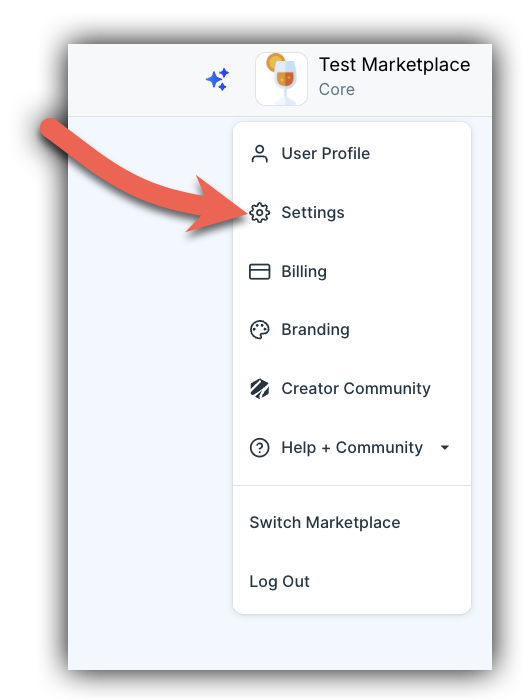
Let's break down each of these settings below:
- Marketplace Name (Required): This is the business/brand name that will appear on your SamCart pages, Marketplace Emails, Order Summary Pages, etc. If you don't yet have a business/brand name, just use your own name!
- Time Zone (Required): The default time zone used in your reports. This will only affect the times displayed in your dashboard and will not affect your reporting exports, the times returned by the API, or the timing of your subscriptions and transfers. These will remain in UTC (Coordinated Universal Time).
- Default Country (Required): When a customer is entering their Billing information, they'll need to select the country they're in from a dropdown menu. This setting determines which Country is first on the list. We recommend choosing the country most of your customers are in.
- Default Language (Optional): Choose a Language for all of your Checkout pages to appear in.
- Marketplace Address (Optional): Your business address. You are required to enter your Marketplace Address if you are using SamCart's Tax feature.
- Show Address on Receipt (Optional): If you would like your address to appear on customer's receipts - toggle this setting ON.
- Support Contact (Recommended): The email address and/or phone number that will appear on your SamCart pages, Order Summary Pages, and Marketplace Emails that customers can use to reach you with questions. This is a highly recommended but optional setting.
- Currency (Required): The currency your SamCart Products will be sold in. For more information, reference this article. After you have created your marketplace, this setting cannot be changed.
- Digital Product Expiration (Only change if necessary): The number of days your digital download links are available for. After this period passes, you'll need to re-send your customers their Order Receipt to provide them a new link. A short period of time makes it harder for your download link to be shared across the web. We recommend keeping the default 2 days.
Marketplace Settings Video Guide
Note: this article contains videos that utilize a previous navigation bar design. Most functions have remained unchanged, but you can always reference this guide which covers the update and differences.